Manifest Tech Blogtag:www.manifest-tech.com,2019:/blog/12019-02-11T21:51:57ZMaking Sense of Digital Media Technology, by Douglas DixonMovable Type Pro 4.38Panasonic Introduces LUMIX S Series Full-Frame Mirrorless Camerastag:www.manifest-tech.com,2019:/blog//1.8462019-02-11T21:50:00Z2019-02-11T21:51:57ZPanasonic has just introduced a new LUMIX S Series line of cameras -- its first full-frame Digital Single Lens Mirrorless cameras, with a 35mm full-frame CMOS sensor. These are focused on full-up professional photographers and videographers, with an emphasis on...LUMIX S Series line of cameras -- its first full-frame Digital Single Lens Mirrorless cameras, with a 35mm full-frame CMOS sensor. These are focused on full-up professional photographers and videographers, with an emphasis on advanced picture quality and extensive creative control.
The S series is launching with two cameras and three lenses, with the cameras very clearly distinguished.
- The LUMIX S1R is designed for professional photographers. It has an astounding 47.3-megapixel full-frame CMOS sensor, plus High-Resolution mode for 187-MP photos.
It also has extensive video capabilities, as expected from Panasonic cameras. Both cameras shoot video to 4K 60p/50p.
- The LUMIX S1 is designed for hybrid use by professional videographers, combining advanced photo capabilities with a 24.2-megapixel full-frame CMOS sensor. It has more cinematic features, including support for MP4 HEVC and 4:2:2 10-bit 4K.
These new LUMIX S series cameras are a big step forward for Panasonic, moving from the smaller and lighter Micro Four Thirds G series to bigger, heavier, and more rugged full-frame cameras designed for professional use.
The S1R with its 47.3 MP sensor targets photographers. It's priced at $3699 (body only), or $4599 with the 24-105mm lens kit.
The S1 with the 24.2 MP sensor is a "hybrid" camera for more balanced use for video and photos. It's priced at $2499 (body only), or $3399 with the 24-105mm lens kit.
Three new lenses are available from Panasonic: The LUMIX S PRO 50mm F1.4 lens is priced at $2299.99, the LUMIX S PRO 70-200mm F4 O.I.S. is $1699.99, and the LUMIX S 24-105mm F4 MACRO O.I.S. is $1299.99.
See full article at Videomaker.com -- Panasonic shares details on new LUMIX S full-frame mirrorless cameras Find the Panasonic LUMIX S1 and
Panasonic LUMIX S1R cameras on Amazon.com ]]>
Ozobot Creative Robottag:www.manifest-tech.com,2018:/blog//1.8452018-12-16T17:50:00Z2018-12-16T03:47:36Z In addition to littleBits (see previous post), another clever approach like to making STEM interesting for kids is the Ozobot Creative Robot. This appears so simple -- it's just a small pocket-size (1 1/4 inch) rolling robot, first released...
In addition to littleBits (see previous post), another clever approach like to making STEM interesting for kids is the Ozobot Creative Robot.
This appears so simple -- it's just a small pocket-size (1 1/4 inch) rolling robot, first released in 2014.
The brilliance of its design is that you can play with it at many different levels. Start out with only pen and paper -- just draw lines to have it follow paths and randomly pick directions at intersections.
The next step is to add simple commands -- just by drawing patterns of colored dots (or using stickers) -- to have the Ozobot change speed, move in a direction, pause, count down until change, and perform pre-defined moves.
Then use the color commands to create activities for the Ozobot to perform, including race tracks, obstacle courses, mazes, puzzles, and other games.
And you can share these online, and download and print designs to try out. The company calls this "screen-free coding" -- you're thinking about programming logic by drawing colors on paper.
You also can bridge the physical and digital worlds by having the Ozobot explore different activities on a tablet. The Ozobot website has a Playground section with a variety of play ideas and printable games, plus interactive games you can play using a web browser with the Ozobot on the tablet screen.
All this physical fun can then transition into programming using the OzoBlockly programming tool, which also runs in the browser.
OzoBlockly is based on Google Blockly, and can grow with you to step through five levels of sophistication. You start with simply dragging and dropping to link icon-based code blocks, with the same kind of logic that you have already done using colored pens. And then you can progress to advanced programming with logic statements.
You transfer the program to the Ozobot by simply holding it up to a circle on the computer or tablet screen, which blinks a sequence of colors to transmit the program -- without requiring connecting any wires or setting up any wireless connection.
There are now two Ozobots available. The original Ozobot Bit ($59) works as described above, and is designed for beginner coding for ages 6 and up.
The new Ozobot Evo ($99) is designed for ages 9 and up, to grow into advanced coding. It adds more lights to flash, proximity sensors for detecting obstacles, a built-in speaker, and a Bluetooth connection.
You can use the Evo app to play games, write code, and connect with others online. The Evo also has a few built-in tricks that it performs out of the box using the proximity sensors, to follow or run away from your hand, or to play musical notes as you touch the different sensors.
There are also DIY (do it yourself) packs for decorating your Ozobot ($10), and Marvel Avengers Action Skins to turn your Evo into a superhero like the Hulk and program its actions ($15 each).
The Ozobot is cleverly designed so that kids can have fun playing, while actually doing creative drawing, problem solving, and group challenges. It teaches concepts like code language, robotic behavior, and deductive reasoning, without books and outside of school.
Ozobot has sold over 750,000 robots, which are used in over 10,000 classrooms across the U.S., from grade 3 to grade 12. For example, they have been used to demonstrate a planetary orbit model with multiple Ozobots following orbit lines.
- See full Holiday Tech 2018 presentation for my local talks in the Princeton area
- See companion article in U.S. 1 Newspaper, Nov. 14, 2018
Find the Ozobot Evo on Amazon ]]>
littleBits - STEM Learning Toys for Smart Kidstag:www.manifest-tech.com,2018:/blog//1.8442018-12-15T18:15:00Z2018-12-15T18:13:54ZThere's a big push to encourage science and technology education, under the acronym STEM (Science, Engineering, Technology, and Math). This has helped to drive innovation in educational toys for kids that can serve as a gateway to STEM, helping kids...littleBits electronic building blocks, is seeing success -- reporting, for example, that up to 40 percent of kids using its kits are girls, four times the industry average.
The littleBits electronic building blocks, first released in 2014, allow kids to engage with electronic circuits by embedding a collection of electronic modules into "Bits" -- small circuit boards that simply snap together magnetically, so no icky wire wrapping or soldering is required.
There are some 70 different bits now available, along with 10 pre-packaged themed inventor kits.
The individual bits are priced starting at $7.95 and $9.95 for basic bits, around $17 to $25 for more complex bits (temperature sensor or servo motor), and up to $39 and $49 for specialty bits (MIDI or MP3 music). These are designed for ages 8 and up.
You build your invention by snapping together the four kinds of bits -- power bits to power the chain, input bits to control the following bits, wire bits to route and change the flow, and output bits to do something at the end.
The input bits include touch controls like buttons, switches, and sliders, sensors for light, motion, and sound, and sound generators like a keyboard and micro sequencer.
The wire bits can perform logic (e.g., and, or, not), fork the signal on multiple paths, and communicate wirelessly to other bits via radio.
Then the output bits display light like a bargraph or number, generate a sound with a buzzer or speaker, or can be in motion, from a fan to a DC motor.
Newer bits can perform even more sophisticated actions that bridge from toy circuits to smartphones and computers. These include taking input from a microphone or MP3 player, communicating using USB or Bluetooth, sending/receiving signals from the Internet, and programming with mini-computer bits (including an Arduino processor).
littleBits also has packaged a variety of kits with a selection of bits for different themed types of inventions. You can get started with Hall of Fame starter kits ($39), a Rule Your Room kit for touch-based inventions ($79), and a Droid inventor kit for creating robots ($99).
The new collection of Inventor Kits include the introductory Base Inventor Kit to build an intruder alarm or voice-activated robotic gripper arm ($99), the Electronic Music Inventor Kit to experiment with electronic instruments from a keyboard synth guitar to a hands-free air drum ($99), and the Space Rover Inventor Kit to customize a planetary rover ($199).
There's also an Avengers Hero Inventor Kit to build high-tech hero gadgets ($149).
littleBits also has packaged kits for educators and classrooms, and has developed over 20,000 school partnerships and 300 invention clubs.
- See full Holiday Tech 2018 presentation for my local talks in the Princeton area
- See companion article in U.S. 1 Newspaper, Nov. 14, 2018
Find the littleBits Base Inventor Kit on Amazon.com ]]>
AirSelfie2 Portable HD Flying Cameratag:www.manifest-tech.com,2018:/blog//1.8432018-12-09T04:55:00Z2018-12-09T04:58:38ZThe AirSelfie2 Portable HD Flying Camera is a small drone with a build-in forward-facing camera that is designed to make it easy for you to shoot photos and videos of small groups -- especially when there are too many people...AirSelfie2 Portable HD Flying Camera is a small drone with a build-in forward-facing camera that is designed to make it easy for you to shoot photos and videos of small groups -- especially when there are too many people to shoot with your extended arm or a selfie stick (and you really need a wider and higher angle anyway).
This second edition of the product includes two key features from pro drones: auto stabilization, so it can hover in place automatically without you needing to constantly tweak the controls, and auto tracking, so it can lock in on your face and keep you in the view even as you move.
Neither of these technologies work perfectly, but they still are quite helpful for making it easier for you to keep it in position while you're trying to set up a shot. In particular, the AirSelfie2 can still drift as it hangs in the air -- typically moving slowly so that it is easy enough to correct with small tweaks, but sometimes and inconsistently worse.
The unit is palm-sized and quite small and light, at 3.8 x 2.8 x 0.5 inches and 2.8 ounces. It can be used outside, but really only in controlled conditions without wind.
You connect to it using its own built-in Wi-Fi hotspot, which should work to a distance of 65 feet, but a distance of more like 20 feet is recommended.
Then use the AirSelfie2 app to control the drone. You first launch it by tossing it gently in the air (from your palm), and land it by descending to your palm or the floor.
It has three choices of flight modes, from tapping buttons for each change in motion (move forward/back, move left/right, or rotate left/right -- all while maintain a level orientation), to joystick mode while tilting your smartphone. You also can raise or lower the speed of movement to work better with the environment and your dexterity.
The AirSelfie2 uses bottom-facing camera and sonar to control its motion, so the company suggests that it works best in a well-lit environment, over flat and multicolored surfaces, and without sound-absorbing surfaces (rugs). Even so, it can handle flying over furniture and other obstacles of different heights and textures.
As you are flying with the AirSelfie2 app, you can monitor the live video from the camera, and tap to shoot photos (or photo sequences) or record video clips. It has a reasonable 12 MP camera with 81 degree field of view, and shoots 1080p HD video (1920 x 1080).
The AirSelfie2 flies for around 5 minutes on a charge. The base product is $199, and there also is a PowerBank accessory (bundled with the AirSelfie2 for around $220) that can recharge the unit 20 times in the field for a total flight time of 75 minutes.
Depending on your propensity for taking selfies of you and groups, you may not have a compelling need for the AirSelfie2 to capture better selfies. But it sure is fun, and a very promising implementation of advanced flight assists in an inexpensive drone.
- See full Holiday Tech 2018 presentation for my local talks in the Princeton area
- See companion article in U.S. 1 Newspaper, Nov. 14, 2018
Find the AirSelfie2 Flying Camera on Amazon
]]>
D-Link Wi-Fi Camerastag:www.manifest-tech.com,2018:/blog//1.8422018-12-07T04:00:00Z2018-12-07T03:58:03ZVideo cameras are becoming quite popular for do-it-yourself home security, with "smart home" products like the Ring Doorbell cameras and the Blink Indoor and Outdoor cameras (acquired by Amazon at the end of 2017). These are designed to monitor an...D-Link, is to build the intelligence and the storage into the camera, with online cloud storage as an option. These cameras detect activity, record clips to a local SD card, send alerts to your smartphone, and optionally upload the video to the cloud. Plus you can monitor them live, continuously, and record while watching, for example to keep an eye out on the driveway for an expected visitor or package delivery.
The D-Link cameras also provide a broad range of configuration options, through the mydlink app and web browser access, including remote viewing with zoom, split-screen to monitor multiple cameras, detection sensitivity (sound and/or motion), selecting zones within the view to monitor, alert types, and use of night vision lighting with IR LEDs. The app also works with Amazon Alexa (Fire TV) and Google Assistant (Chromecast).
The core D-Link line has four wireless cameras.
The base D-Link Mini HD Wi-Fi Camera for $59 (two for $99) is small cylindrical camera (3.6 inches tall) designed for indoor use, and which records only to the cloud.
It captures HD 720p video (1280 x 720), with a 120 degree field of view. It alerts on sound or motion, and the night vision IR LEDs illuminate up to 16 feet in complete darkness.
The D-Link HD Wi-Fi Camera for $59 is an adjustable camera with similar specs and about the same height, but stores video locally and optionally to the cloud.
It also not only records audio with video, but also has a speaker to support two-way conversations.
The D-Link Full HD Wi-Fi Camera for $79 then steps up to higher-res 1080p Full HD video (1920 x 1080).
It has a wider 130 degree field of view and is a bit taller at 4.3 inches.
Finally, there's the D-Link Full HD Pan & Tilt Wi-Fi Camera for $99.
This is a 1080p camera with 114 degree field of view. It's a bit chunkier at 4.38 x 5.26 x 4.58 inches, and 0.73 pounds.
Plus, it adds the ability to see a much wider area by remotely panning side by side to see behind (170 degrees to each side) and tilting it up and down (up 90 degrees to look straight up and down 20 degrees).
The D-Link setup process is relatively painless. You download the app, scan the QR code on the camera to identify it, and then set up the camera on your Wi-Fi network (done transparently through Bluetooth, so you don't need to manually mess around with settings). This worked successfully in most of my tests, although sometimes the app needed to re-try the Wi-Fi setup. Just watch out that there are multiple "mydlink" apps in the app stores (Lite, Home, etc.) -- you need "mydlink" without any modifiers.
Finally, D-Link does provide monthly plans for its cloud storage option, which are designed for extending storage for multiple cameras. You can store video for free for 24 hours, with up to 3 cameras. You can extend this to 7 days for $2.49 a month or $24.99 a year, or 14 days with 5 cameras for $4.99 / $44.99, up to 30 days with 10 cameras for $9.99 / $99.99.
Smart cloud security cameras are a great inexpensive alternative for alerting on activity in specific areas like the front porch. But for not much more you can get a more flexible camera that allows you to watch areas live, provides more flexible control over how it monitors, and stores and retains video locally without additional monthly costs.
- See full Holiday Tech 2018 presentation for my local talks in the Princeton area
- See companion article in U.S. 1 Newspaper, Nov. 14, 2018
Find the D-Link Mini HD Wi-Fi Camera, HD Wi-Fi Camera,
Full HD Wi-Fi Cam, and Pan & Tilt Wi-Fi Cam on Amazon ]]>
Plantronics Bluetooth Headsetstag:www.manifest-tech.com,2018:/blog//1.8412018-12-03T04:55:00Z2018-12-03T05:23:30ZBluetooth wireless earbuds are the minimalistic approach to personal music, with just the two small earbuds (see previous post). But the small size means tradeoffs, including shorter battery life. If you are looking for other alternatives, Plantronics offers a wide...
previous post).
But the small size means tradeoffs, including shorter battery life. If you are looking for other alternatives, Plantronics offers a wide range of listening products, both single-ear earpieces used mostly for phone calls, and stereo headsets and earbuds in a variety of styles - in the ear, over the ear, over the head, and behind the head -- and for use in the office and for travel.
In particular, these Plantronics products are designed for extended music playback and can help you relax on long trips with extended listening times (8+ hours), voice assistant integration (Apple Siri or Hey Google), and built-in active noise-canceling (ANC).
ANC provides clearer audio in high- and low-noise environments, especially by filtering out low frequency noises like AC, fans, motors, and buzzing electronics. The noise-canceling level can be controlled from the Plantronics Backbeat app, along with selecting balanced or bright EQ modes.
For longer use in earbuds, the Plantronics BackBeat GO 410 Earbuds add a flexible neckband that sits behind your head, with cables running up to the two earbuds.
This design provides the space for extended use -- up to 8 hours listening with ANC, and 10 hours without ANC. And it allows the use of additional electronics, especially the active noise-canceling and voice assistant integration.
They also allow you to insert and remove the earbuds easily. When you remove them, they snap together magnetically to hang out of the way, which also turns off ANC and disconnects Bluetooth to save power. And unlatching them will automatically re-connect Bluetooth and answer an incoming call.
The power cable also is dual-use - the USB charging tip pops off to convert the cable into a standard 3.5 mm audio connector, so you can still use the earbuds with a wired connection even if the battery is dead.
The BackBeat GO 410 Earbuds are available for around $129, in black and white.
Then, of course, the best way to isolate yourself on a long plane trip is to use over-the ear headphones, like the Plantronics BackBeat GO 810 Headphones.
These are designed for commuters and travelers, with up to 22 hours of listening time with ANC, and 28 without ANC.
They have a slim over-the-ear design with memory-foam padding, weigh only 7 ounces, and fold flat for travel.
The earpieces have room for multiple controls, including volume, skip tracks, and take calls, plus manual controls including select EQ presets, ANC on/off, and activate voice assistants.
The headphones support an extended range Bluetooth connection of up to a 164 feet with compatible devices. You also can connect to two devices simultaneously and stream from either one.
The Plantronics BackBeat GO 810 headphones are available for around $149, in blue, black, or white.
Either way, you can have comfortable extended listening, and still be able to move around without being tethered to your smartphone or tablet. The active noise-canceling is a nice bonus, and without the strong pressure you have felt with older products.
- See full Holiday Tech 2018 presentation for my local talks in the Princeton area
- See companion article in U.S. 1 Newspaper, Nov. 14, 2018
Find the Plantronics BackBeat GO 410 Earbuds and
BackBeat GO 810 Headphones on Amazon.com ]]>
Altec Lansing True EVO Wireless Earbudstag:www.manifest-tech.com,2018:/blog//1.8402018-11-21T05:30:00Z2018-11-21T05:29:38ZBeyond wireless portable speakers (see previous post), the best way to hear music is to put the speakers directly in your ears, as wireless earbuds. These are truly wireless, with no cable between the two earpieces and no cable to...
previous post), the best way to hear music is to put the speakers directly in your ears, as wireless earbuds. These are truly wireless, with no cable between the two earpieces and no cable to the audio player.
The issue, of course, is that the earbuds need to be small and light to fit comfortably in your ear, but also need to hold a large enough battery to last for a reasonable length of time. Plus, the earbuds are so small that it's tricky to keep them safe and accounted for when you take them out.
One nice solution, used with the Altec Lansing True EVO Wireless Earbuds, is to provide a carrying case to store the earbuds and keep them safe.
Altec Lansing also builds battery into the case, so whenever you remove the earbuds they can be immediately recharging in the case.
The True EVO earbuds have a 4 hour battery life, plus can add 4 additional charges from the case.
Then, as an extra bonus, the case can be charged not only by USB, but also through Qi wireless charging. So just place the case on a Qi charger and it also can recharge with no wires.
The other issue with earbuds is the hostile environment that builds up in your ears when you move around and exercise. The True EVO earbuds are designed to be rugged, especially for sports, and are sweatproof and waterproof.
These also provide double-tap access to the Apple Siri or Hey Google voice assistant, and have a 30 feet wireless range.
To minimize your audio equipment, the Altec Lansing True EVO Wireless Earbuds are available for around $99.
- See full Holiday Tech 2018 presentation for my local talks in the Princeton area
- See companion article in U.S. 1 Newspaper, Nov. 14, 2018
Find the Altec Lansing True EVO Wireless Earbuds
on Amazon.com ]]>
Altec Lansing Portable Bluetooth Wireless Speakerstag:www.manifest-tech.com,2018:/blog//1.8392018-11-20T03:05:00Z2018-11-20T03:08:31ZThe excitement in audio recently has been in Wi-Fi speakers for smart homes that can be coordinated and controlled by voice commands. But Bluetooth wireless speakers still are very useful -- especially as a personal, easily-portable speakers that can move...Altec Lansing line of portable speakers also integrate with voice assistants, and some support extended range for the Bluetooth connection -- up to 100 feet.
For personal use, at your desk or in a hotel room, you can start with a mini speaker like the Altec Lansing Baby Boom, a compact, rugged speaker that is smaller than your hand (around 4 x 2 x 1 inches, and 1/4 pound).
The Baby Boom puts out impressive sound for its size, with two 1" drivers with neodymium magnets.
You can pair two of them as stereo speakers, with a 30 foot wireless range. And it works as a hands-free speakerphone for your smartphone. It also has a 3.5 mm auxiliary input to play from other wired sources.
The Altec Lansing Baby Boom has 6 hours of battery life, is waterproof and floats, and is available for around $29. It even has a carabineer clip to attach to your backpack.
Or step up to a slightly larger speaker like the Altec Lansing Mini LifeJacket Jolt, a compact speaker with serious bass (around 6 1/4 x 2 1/2 x 2 1/4 inches).
This is not quite pocket size, with dual 1.5" neodymium drives / woofers plus two 40mm passive radiators, has a 100 foot wireless range, and you can pair up to 50 speakers at once for a big house party.
It also has a dedicated button to activate Apple Siri or Google Assistant, and is waterproof and floats.
The Altec Lansing Mini LifeJacket Jolt has 16 hours of battery life, and has a USB port so it also can be used as a charger for your smartphone. It's available for around $79.
Then the Altec Lansing Versa line of smart speakers pairs and plays over both Bluetooth (for on the go) and Wi-Fi (for at home). Use the Altec Lansing VersA Navigator app for Wi-Fi setup and to bridge to Amazon Alexa for tap-to-talk voice control.
The smaller Altec Lansing VersA 2 Go model is still relatively compact (around 4 x 4 x 2 inches).
It delivers impressive sound with a 1.75" woofer and 2" passive radiator, with a 100 foot wireless range.
Altec Lansing VersA 2 Go is waterproof, has 8 hours of battery life, and is available for around $69., It also has a carabineer clip.
So in the range of $29 to $79 you can have a rugged Bluetooth speaker that syncs cleanly with your smartphone to deliver improved sound and relay voice commands. They talk to you to confirm power on and Bluetooth pairing status. These also all have a two-sided design, to fill a space better by pumping out sound in all directions.
- See full Holiday Tech 2018 presentation for my local talks in the Princeton area
- See companion article in U.S. 1 Newspaper, Nov. 14, 2018
Find the Altec Lansing Mini LifeJacket Jolt
on Amazon.com ]]>
TP-Link - Smart Home Power and Bulbstag:www.manifest-tech.com,2018:/blog//1.8382018-11-14T03:55:00Z2018-11-20T02:47:27ZSmart Home companies like TP-Link make products that you can use to control and manage your home, including the TP-Link Kasa Smart line of Wi-Fi plugs, light bulbs, light switches, and smart camera -- plus the networking routers and Wi-Fi...TP-Link Kasa Smart line of Wi-Fi plugs, light bulbs, light switches, and smart camera -- plus the networking routers and Wi-Fi extenders to use to communicate with these devices.
These smart devices can be controlled and scheduled from the Kasa app, or by voice from digital assistants like Amazon Alexa and Google Assistant. (See Holiday 2017 for more on Smart Home devices.)
While this year's crop of smart home devices does not feature exotic new technology, it is another striking example of how technology continues to advance with better, smaller, and cheaper products.
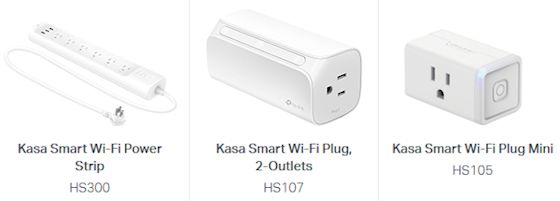
For example, the TP-Link Kasa Smart Plugs allow you to remotely control anything that you plug into them, for example to turn the holiday decorations on and off.
The new TP-Link Kasa Smart Plug Mini (HS105) has also dropped in price, now at around $26 compared to $34 last year.
But the real fun is the new TP-Link Kasa Smart Wi-Fi Power Strip (HS300), which crams 6 smart outlets plus 3 USB charging ports onto a power strip -- for only around $79.
Yes, the power strip is a tad long at 14.17 x 2.49 x 1.48 inches and 1.55 pounds, but you get full control of the outlets -- you can power them on and off independently, or all together as a group.
The Kasa Smart Power Strip also monitors the energy usage of the connected devices, and provides surge protection.
Similarly, this year's TP-Link Kasa Smart Light Bulb line includes new dimmable (adjust brightness), Tunable (soft to bright light), and Multicolor bulbs that have improved in all three of these ways.
The new TP-Link Kasa Multicolor Smart Light Bulb (KL130) is dimmable, tunable, and can adjust the color (2500K - 9000K). The big difference is the further compaction of the Wi-Fi and color tuning electronics, thinning the shape so that it's even closer to the volume of a traditional light bulb.
Kasa Multicolor Smart Light Bulb is available for around $39, compared to $42 for the previous model last year.
And it's smaller -- 4.65 x 2.36 inches vs 5.14 x 2.56 inches (118 x 60 mm vs 130.5 x 65 mm) -- and lighter -- 0.3 pounds vs 0.4 pounds (139 g vs 180 g).
So it's fun to see the improvement in these products in just a year, and to control devices in your home to make them smart. For example, think about what you can do with holiday decorations -- displaying colors and controlling other decorations directly, or by setting up a daily schedule of changes over time.
- See full Holiday Tech 2018 presentation for my local talks in the Princeton area
- See companion article in U.S. 1 Newspaper, Nov. 14, 2018
Find the TP-Link Smart Power Strip and
and TP-Link Smart Light Bulb on Amazon.com ]]>
Ventev - Wireless Chargingtag:www.manifest-tech.com,2018:/blog//1.8372018-11-06T16:50:00Z2018-11-20T02:47:08ZWireless charging sounds like such a great idea -- No more profusion of cables, and no more confusing plugs that always seem to be the wrong type or positioned upside down. Instead, just put your device down on a mat...
Qi standard, from the Wireless Power Consortium (WPC). (Think of qi as meaning "energy flow" from the Chinese.)
Qi wireless charging has the support of major manufacturers, including Apple, ASUS, Canon, Dell, Google, Lenovo, LG, Panasonic, Samsung, and Sony, and is built in to Apple's iPhone 8, iPhone 8 plus, and iPhone X.
These products use inductive wireless power transfer, which requires close contact (basically directly touching), and typically also requires aligning the device with the coils in the charging plate.
A second technology, resonant wireless charging, offers a more relaxed distance (up to 45 mm / 1.7 in), which is especially interesting for devices like laptops and wearables. This is under development by the WPC, as well as the new AirFuel Alliance, which was formed from several competing groups including the Power Matters Alliance (PMA), which has been used in some products.
Wireless chargers are typically designed as mats or pucks that you can lay a smartphone down on. Of course, you do then need to plug in the charging plate.
Ventev also offers the Ventev Wireless Chargestand for smartphones, in addition to its traditional batteries and chargers (see previous post).
The Wireless Chargestand is a combination desktop charger and smartphone stand. The wireless charging puck is removable, so you can use it (and the stand) independently.
The stand and its aluminum frame are adjustable, for two viewing angles, for different positions (portrait, landscape, or flat on table), and for optimal charging centered on the back of the smartphone.
The Chargestand provides 15W of power, so you can use the smartphone while it is charging. And it supports fast wireless charging, so the smartphone can charge 50% in one hour. It also has built-in protection from short circuit, overcharge, overdischarge, and overcurrent.
Interestingly, the Chargestand supports both the Qi and PMA wireless charging standards, so can work with a variety of older and newer devices.
The Ventev Wireless Chargestand is available for around $59. It's a nice flexible design, supporting multiple uses (flat and as a stand), and multiple devices (Qi and PMA).
- See full Holiday Tech 2018 presentation for my local talks in the Princeton area
- See companion article in U.S. 1 Newspaper, Nov. 14, 2018
Find the Ventev Wireless Chargestand on Amazon.com ]]>
Ventev Portable Batteriestag:www.manifest-tech.com,2018:/blog//1.8362018-11-03T23:00:00Z2018-11-20T02:46:48ZEven with continued technological advances, our portable devices still require power, which becomes more of a problem when we're on the go and bring along more and more such thirsty devices. Ventev offers a nice range of power accessories, including...Ventev offers a nice range of power accessories, including portable batteries, wall chargers, and car ports -- with its trademark matte light grey finish with orange accents.
For example, the Ventev Powercell 6010+ Backup Battery is a combination external battery pack and wall charger. It has everything you need built in - folding AC prongs to plug in to the wall to recharge the battery, and a built-in cable (Apple Lightning or USB type C) to feed your devices.
The 6000 mAh battery has 12W total output, so it can charge a tablet, or two smartphones at once (using the built-in cable and the additional USB port). It recharges in 4 to 5 hours
But it still is relatively small and light -- shirt-pocket size at 5.2 x 0.7 x 2.7 inches, and 6.7 ounces.
The Ventev Powercell 6010+ is available for around $49 in two versions, with Apple Lightning or USB type C cable. Another option is a combination desktop charging stand and backup battery like the Ventev Chargestand 3000c Backup Battery/Stand.
This is a lightweight combination portable desktop charger, stand, and battery. It's around 3 1/8 x 2 1/4 x 1 1/8 inches.
As a stand, it pops open so you can position your smartphone in either portrait or landscape orientations.
As a desktop charger, you can dock your smartphone with the included flat cable that nests in the stand.
As a portable battery, you can close the stand and unroll the built-in cable to charge your smartphone on the go. The 3000mAh battery charges one smartphone, and recharges in 3 to 4 hours.
The Ventev Chargestand 3000c is available for around $49 in three versions, with built-in microUSB, USB-C, or Apple Lightning cable.
- See full Holiday Tech 2018 presentation for my local talks in the Princeton area
- See companion article in U.S. 1 Newspaper, Nov. 14, 2018
Find the Ventev Powercell 6010+ and
Ventev Chargestand 3000c on Amazon.com ]]>
Western Digital Portable Wireless Drivestag:www.manifest-tech.com,2018:/blog//1.8352018-11-01T03:55:00Z2018-11-20T02:46:28ZThe Western Digital My Passport Ultra hard-disk drive and My Passport SSD drive provide highly portable and rather inexpensive storage that you just cable up to your computer (see previous post). Or you can go wireless with the Western Digital...
previous post).
Or you can go wireless with the Western Digital My Passport Wireless drives that also can communicate over Wi-Fi, so you can access them from multiple devices, including computers, smartphones and tablets, and even for direct FTP transfers from a camera.
Plus they have a built-in SD card reader, and can serve as an external battery power source for your other portable devices.
The WD My Passport Wireless Pro is a wireless hard-disk drive, SD card reader, and powerbank. It's about 5 x 5 inches square and 0.9 inches thick, and weighs around 15 1/2 ounces.
It's available with 1 TB of storage for around $149, 2 TB for $139, 3 TB for $199, and 4 TB for $189. The WD My Passport Wireless SSD provides the same functions with a solid-state drive. It's especially durable with the SSD electronics and a protective bumper, so it's protected from shock, vibrations, and drops of up to 1 meter, even in operation.
It's available with 256 GB of storage for around $229, 500 GB for $299, 1 TB for $499, and 2 TB for $799.
For the fastest wireless connection, you connect directly to the drive as its own Wi-Fi hotspot. Or you can connect your devices and the drive to your local Wi-Fi connection, which then allows you to access the Internet as well -- although with lower transfer rates since the connection is indirect and shared.
You then can use the drive's Dashboard Web interface to set up the drive and transfer files. Or you can access the drive using the WD My Cloud app for iOS or Android. The drives also include DLNA and Plex media servers to stream to smart TVs and other devices.
You also can use the built-in SD card reader to share files from cameras or other devices, or to back up the contents of SD cards.
Plus, for wired connections, these drives have both a USB 3.0 port and a USB 2.0 port. With these, you can connect directly to a computer as a standard external drive, plug in another USB device and share its contents wirelessly, or power another portable battery from the built-in battery. The battery provides 10 hours of continuous use, whether recording files or streaming media.
These WD My Passport Wireless drives are multi-talented wireless hubs -- both to share from the built-in disk, SD cards, another USB drive, and even wireless cameras over FTP -- and to share to multiple other devices including laptops, smartphones, and tablets.
That's a lot of features, but wonderfully flexible and useful when you need them, whether assembling files and media from multiple sources in the field, or providing access to common files among several people and systems.
- See full Holiday Tech 2018 presentation for my local talks in the Princeton area
- See companion article in U.S. 1 Newspaper, Nov. 14, 2018
Find the WD My Passport Wireless Pro and
WD My Passport Wireless SSD on Amazon.com ]]>
Western Digital Portable Drives - Hardware Encryptiontag:www.manifest-tech.com,2018:/blog//1.8342018-10-31T03:59:00Z2018-11-20T02:46:05ZSD cards are great for local storage on portable devices, and for transferring files between these small devices and computers (see earlier post). But if you need serious external storage for computers -- with lots of capacity and big-file speed...
earlier post).
But if you need serious external storage for computers -- with lots of capacity and big-file speed (especially for high-def video) -- you really need an external hard drive. And today, you'll be getting at least 1 TB or more of storage, starting at around only $50.
Western Digital (WD) has a nice line of portable storage products to go along with its larger external and networked storage units, internal drives, and business / enterprise products.
The portable drives typically include USB 3.0 interfaces, easy-to-carry sizes (around 3 1/4 x 4 1/3 inches and 1/2 to 3/4 inch thick), and capacities of 1, 2, or 4 GB. They can be used on Windows or Mac systems (sometimes after reformatting), and some also come in Mac-specific versions.
You can get simple plug-and-play drives starting as low as around $50, but for $10 to $20 more you can step up to higher-performance drives with built-in encryption.
Hardware encryption is a big deal for external storage. The contents of your drive can be encrypted and protected, so the drive is always safe from prying eyes if happens to wander off. And the encryption is in hardware, so it's built-in and unnoticeable.
To unlock the drive, you to run WD software to enter a password. (The software is always available on a virtual drive when you attach the drive.) The WD Discovery software package includes Security tools, Backup tools (from/to external drives and/or online cloud storage services), and general Drive Utilities.
The WD My Passport portable drives are available with both Hard Disk Drive and SSD technology:
Hard Disk Drives (HDD) use mechanical spinning magnetic platters, but still are significantly less expensive and offer higher capacities (at realistic prices).
Solid State Drives (SSD) are basically memory chips, and therefore are smaller, faster, and more rugged, which is especially wonderful for small, thin, and light laptops. However, SSD still is expensive -- with prices that are multiples of hard-disk drives.
You can start with the Western Digital My Passport Ultra portable hard drive. It's slim and light (4.44 x 3.21 x 0.50 in), with a textured anodized metal cover. It has a native USB-C interface to work with newer products, and also comes with a USB 3.0 adapter for the rest of your systems.
The My Passport Ultra has hardware encryption, and is available with 1 TB of storage for $69, 2 TB for $89, and 4 TB for $129. Then the Western Digital My Passport SSD provides the advantages of solid-state storage, in a smaller and thinner package (3.5 x 1.8 x 0.39 in.), also with a USB-C native interface and hardware encryption.
However, the My Passport SSD has a serious jump in price for the benefits of SSD -- 250 GB for around $99, 512 GB for $149, 1 TB for $299, and 2 TB for $599.
The bottom line is that you can have a solid drive that easily fits in your shirt pocket and protects all your data, starting at under $70 for 1 TB of storage.
- See full Holiday Tech 2018 presentation for my local talks in the Princeton area
- See companion article in U.S. 1 Newspaper, Nov. 14, 2018
Find the WD My Passport Ultra and
WD My Passport SSD on Amazon.com ]]>
Kingston Duo Flash Drives for Smartphones and Tabletstag:www.manifest-tech.com,2018:/blog//1.8332018-10-30T02:50:00Z2018-11-20T02:45:45ZPhysical storage in the form of microSD cards (see earlier post) are convenient for smartphones and tablets that do have card slots (like some Android products), but not so much for other devices like Apple iPhones and iPads that don't...
earlier post) are convenient for smartphones and tablets that do have card slots (like some Android products), but not so much for other devices like Apple iPhones and iPads that don't have slots.
But all such devices have some sort of physical connector -- typically microUSB (or more recently USB Type C) on Android devices, and the Apple Lightning connector on iPhones and iPads. So wouldn't it be great to have a dedicated flash drive that connected to both your portable devices and to your computer, so you could transfer files directly between them, without the need for intermediate SD cards or the vagaries and slower speeds of wireless connections or cloud services?
This is the idea behind the Kingston "Duo" products -- small flash drives that have both a standard USB port for computers, and a second port for portable devices, either microUSB, USB-C, or Apple Lightning.
The Kingston DataTraveler microDuo 3C is a dual drive with both standard USB and USB-C ports.
It works with Android devices that support USB OTG (On-The-Go) drives to provide expanded storage like a flash drive.
The microDuo 3C is tiny at less than 1.2 inches long, and seriously inexpensive at 32 GB of storage for around $12, 64 GB for $19, and 128 GB for $39.
Similarly, the Kingston DataTraveler Bolt Duo provides extended storage for iPhones and iPads, with both a USB and a Lightning connector.
Since iOS does not support general file access to storage, the Bolt Duo focuses on handling your photos and videos. You can transfer your photos/videos to the drive, capture directly to the drive, and view the files on the drive.
You also can set up the device to automatically back up photos and videos from your camera roll, and even optionally delete the originals to free up space.
The Bolt Duo supports USB 3.1 transfer speeds (120MB/s read and 19MB/s write), and is available with 32 GB of storage for around $34, 64 GB for $39, and 128 GB for $69.
With these capacities, "just" 32 GB holds up to some 8,000 photos or 2 hours of video, and 128 GB holds up to 32,000 photos or 8 hours of video.
- See full Holiday Tech 2018 presentation for my local talks in the Princeton area
- See companion article in U.S. 1 Newspaper, Nov. 14, 2018
Find the Kingston DataTraveler microDuo 3C and
Kingston DataTraveler Bolt Duo on Amazon.com ]]>
Kingston Card Readers and Hubs - SD to USB-Ctag:www.manifest-tech.com,2018:/blog//1.8322018-10-28T23:40:00Z2018-11-20T02:45:27ZSD cards are not just for smartphones and cameras and other portable devices (see previous post) -- They also can bridge your files between your portable devices and your computer. Most portable devices write files to SD cards in formats...
previous post) -- They also can bridge your files between your portable devices and your computer.
Most portable devices write files to SD cards in formats that computers can read, so once you connect the card to a computer you then can immediately browse and copy the files. And some computers already have built-in SD card slots (which also can read microSD cards with a SD-sized adapter card).
Otherwise, you can use a card reader like the Kingston MobileLite G4 USB 3.0 Card Reader to plug in to a USB port on the computer and then insert cards to read.
The MobileLite G4 is small so it's easy to pack along with your laptop, with a rugged metallic design.
You can insert and access both a SD and a microSD card simultaneously, and transfer at USB 3.0 rates. The MobileLite G4 is available for around $11, so it's easy to always have with your computer.
But USB 3.0 is so old hat -- USB Type C is the new, better connector that is now being used on both laptops and on portable devices including smartphones and tablets.
For portable devices, USB-C is like microUSB, except that the connector is reversible -- so that you no longer need to fuss with plugging in a cable the right way around.
And for laptops, it's smaller than USB, and has the capacity to be used for power, disk data transfers, and even digital video displays.
The Kingston Nucleum USB-C Hub is a multiport adapter that showcases the flexibility of USB-C. This small and light device includes a built-in cable to plug in to your host laptop, and then provides 7 expansion ports:
USB-C power port - Pass-through power to the laptop so it can charge while the hub is in use
USB-C data port - Connect USB-C peripherals like a fast hard drive
2 USB-A ports (USB 3.1) - Connect to peripherals including mouse, keyboard, or hard drive (also with power pass-through to charge the devices)
HDMI port - Display to an external monitor or projector (Up to 4K UHD or Full HD 1080p)
SD & microSD slots - Especially to directly ingest camera files / footage (SD/SDHC/SDXC UHS I-II)
 The S series is launching with two cameras and three lenses, with the cameras very clearly distinguished.
- The LUMIX S1R is designed for professional photographers. It has an astounding 47.3-megapixel full-frame CMOS sensor, plus High-Resolution mode for 187-MP photos.
It also has extensive video capabilities, as expected from Panasonic cameras. Both cameras shoot video to 4K 60p/50p.
The S series is launching with two cameras and three lenses, with the cameras very clearly distinguished.
- The LUMIX S1R is designed for professional photographers. It has an astounding 47.3-megapixel full-frame CMOS sensor, plus High-Resolution mode for 187-MP photos.
It also has extensive video capabilities, as expected from Panasonic cameras. Both cameras shoot video to 4K 60p/50p.  Find the Panasonic LUMIX S1 and
Panasonic LUMIX S1R cameras on Amazon.com
Find the Panasonic LUMIX S1 and
Panasonic LUMIX S1R cameras on Amazon.com The next step is to add simple commands -- just by drawing patterns of colored dots (or using stickers) -- to have the Ozobot change speed, move in a direction, pause, count down until change, and perform pre-defined moves.
Then use the color commands to create activities for the Ozobot to perform, including race tracks, obstacle courses, mazes, puzzles, and other games.
And you can share these online, and download and print designs to try out. The company calls this "screen-free coding" -- you're thinking about programming logic by drawing colors on paper.
You also can bridge the physical and digital worlds by having the Ozobot explore different activities on a tablet. The Ozobot website has a Playground section with a variety of play ideas and printable games, plus interactive games you can play using a web browser with the Ozobot on the tablet screen.
The next step is to add simple commands -- just by drawing patterns of colored dots (or using stickers) -- to have the Ozobot change speed, move in a direction, pause, count down until change, and perform pre-defined moves.
Then use the color commands to create activities for the Ozobot to perform, including race tracks, obstacle courses, mazes, puzzles, and other games.
And you can share these online, and download and print designs to try out. The company calls this "screen-free coding" -- you're thinking about programming logic by drawing colors on paper.
You also can bridge the physical and digital worlds by having the Ozobot explore different activities on a tablet. The Ozobot website has a Playground section with a variety of play ideas and printable games, plus interactive games you can play using a web browser with the Ozobot on the tablet screen.
 All this physical fun can then transition into programming using the OzoBlockly programming tool, which also runs in the browser.
OzoBlockly is based on Google Blockly, and can grow with you to step through five levels of sophistication. You start with simply dragging and dropping to link icon-based code blocks, with the same kind of logic that you have already done using colored pens. And then you can progress to advanced programming with logic statements.
You transfer the program to the Ozobot by simply holding it up to a circle on the computer or tablet screen, which blinks a sequence of colors to transmit the program -- without requiring connecting any wires or setting up any wireless connection.
There are now two Ozobots available. The original Ozobot Bit ($59) works as described above, and is designed for beginner coding for ages 6 and up.
All this physical fun can then transition into programming using the OzoBlockly programming tool, which also runs in the browser.
OzoBlockly is based on Google Blockly, and can grow with you to step through five levels of sophistication. You start with simply dragging and dropping to link icon-based code blocks, with the same kind of logic that you have already done using colored pens. And then you can progress to advanced programming with logic statements.
You transfer the program to the Ozobot by simply holding it up to a circle on the computer or tablet screen, which blinks a sequence of colors to transmit the program -- without requiring connecting any wires or setting up any wireless connection.
There are now two Ozobots available. The original Ozobot Bit ($59) works as described above, and is designed for beginner coding for ages 6 and up.
 The new Ozobot Evo ($99) is designed for ages 9 and up, to grow into advanced coding. It adds more lights to flash, proximity sensors for detecting obstacles, a built-in speaker, and a Bluetooth connection.
You can use the Evo app to play games, write code, and connect with others online. The Evo also has a few built-in tricks that it performs out of the box using the proximity sensors, to follow or run away from your hand, or to play musical notes as you touch the different sensors.
There are also DIY (do it yourself) packs for decorating your Ozobot ($10), and Marvel Avengers Action Skins to turn your Evo into a superhero like the Hulk and program its actions ($15 each).
The Ozobot is cleverly designed so that kids can have fun playing, while actually doing creative drawing, problem solving, and group challenges. It teaches concepts like code language, robotic behavior, and deductive reasoning, without books and outside of school.
Ozobot has sold over 750,000 robots, which are used in over 10,000 classrooms across the U.S., from grade 3 to grade 12. For example, they have been used to demonstrate a planetary orbit model with multiple Ozobots following orbit lines.
- See full Holiday Tech 2018 presentation for my local talks in the Princeton area
- See companion article in U.S. 1 Newspaper, Nov. 14, 2018
The new Ozobot Evo ($99) is designed for ages 9 and up, to grow into advanced coding. It adds more lights to flash, proximity sensors for detecting obstacles, a built-in speaker, and a Bluetooth connection.
You can use the Evo app to play games, write code, and connect with others online. The Evo also has a few built-in tricks that it performs out of the box using the proximity sensors, to follow or run away from your hand, or to play musical notes as you touch the different sensors.
There are also DIY (do it yourself) packs for decorating your Ozobot ($10), and Marvel Avengers Action Skins to turn your Evo into a superhero like the Hulk and program its actions ($15 each).
The Ozobot is cleverly designed so that kids can have fun playing, while actually doing creative drawing, problem solving, and group challenges. It teaches concepts like code language, robotic behavior, and deductive reasoning, without books and outside of school.
Ozobot has sold over 750,000 robots, which are used in over 10,000 classrooms across the U.S., from grade 3 to grade 12. For example, they have been used to demonstrate a planetary orbit model with multiple Ozobots following orbit lines.
- See full Holiday Tech 2018 presentation for my local talks in the Princeton area
- See companion article in U.S. 1 Newspaper, Nov. 14, 2018
 The littleBits electronic building blocks, first released in 2014, allow kids to engage with electronic circuits by embedding a collection of electronic modules into "Bits" -- small circuit boards that simply snap together magnetically, so no icky wire wrapping or soldering is required.
There are some 70 different bits now available, along with 10 pre-packaged themed inventor kits.
The individual bits are priced starting at $7.95 and $9.95 for basic bits, around $17 to $25 for more complex bits (temperature sensor or servo motor), and up to $39 and $49 for specialty bits (MIDI or MP3 music). These are designed for ages 8 and up.
You build your invention by snapping together the four kinds of bits -- power bits to power the chain, input bits to control the following bits, wire bits to route and change the flow, and output bits to do something at the end.
The littleBits electronic building blocks, first released in 2014, allow kids to engage with electronic circuits by embedding a collection of electronic modules into "Bits" -- small circuit boards that simply snap together magnetically, so no icky wire wrapping or soldering is required.
There are some 70 different bits now available, along with 10 pre-packaged themed inventor kits.
The individual bits are priced starting at $7.95 and $9.95 for basic bits, around $17 to $25 for more complex bits (temperature sensor or servo motor), and up to $39 and $49 for specialty bits (MIDI or MP3 music). These are designed for ages 8 and up.
You build your invention by snapping together the four kinds of bits -- power bits to power the chain, input bits to control the following bits, wire bits to route and change the flow, and output bits to do something at the end.
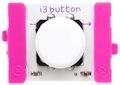 The input bits include touch controls like buttons, switches, and sliders, sensors for light, motion, and sound, and sound generators like a keyboard and micro sequencer.
The wire bits can perform logic (e.g., and, or, not), fork the signal on multiple paths, and communicate wirelessly to other bits via radio.
The input bits include touch controls like buttons, switches, and sliders, sensors for light, motion, and sound, and sound generators like a keyboard and micro sequencer.
The wire bits can perform logic (e.g., and, or, not), fork the signal on multiple paths, and communicate wirelessly to other bits via radio.
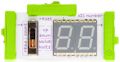 Then the output bits display light like a bargraph or number, generate a sound with a buzzer or speaker, or can be in motion, from a fan to a DC motor.
Newer bits can perform even more sophisticated actions that bridge from toy circuits to smartphones and computers. These include taking input from a microphone or MP3 player, communicating using USB or Bluetooth, sending/receiving signals from the Internet, and programming with mini-computer bits (including an Arduino processor).
littleBits also has packaged a variety of kits with a selection of bits for different themed types of inventions. You can get started with Hall of Fame starter kits ($39), a Rule Your Room kit for touch-based inventions ($79), and a Droid inventor kit for creating robots ($99).
Then the output bits display light like a bargraph or number, generate a sound with a buzzer or speaker, or can be in motion, from a fan to a DC motor.
Newer bits can perform even more sophisticated actions that bridge from toy circuits to smartphones and computers. These include taking input from a microphone or MP3 player, communicating using USB or Bluetooth, sending/receiving signals from the Internet, and programming with mini-computer bits (including an Arduino processor).
littleBits also has packaged a variety of kits with a selection of bits for different themed types of inventions. You can get started with Hall of Fame starter kits ($39), a Rule Your Room kit for touch-based inventions ($79), and a Droid inventor kit for creating robots ($99).
 The new collection of Inventor Kits include the introductory Base Inventor Kit to build an intruder alarm or voice-activated robotic gripper arm ($99), the Electronic Music Inventor Kit to experiment with electronic instruments from a keyboard synth guitar to a hands-free air drum ($99), and the Space Rover Inventor Kit to customize a planetary rover ($199).
There's also an Avengers Hero Inventor Kit to build high-tech hero gadgets ($149).
littleBits also has packaged kits for educators and classrooms, and has developed over 20,000 school partnerships and 300 invention clubs.
- See full Holiday Tech 2018 presentation for my local talks in the Princeton area
- See companion article in U.S. 1 Newspaper, Nov. 14, 2018
The new collection of Inventor Kits include the introductory Base Inventor Kit to build an intruder alarm or voice-activated robotic gripper arm ($99), the Electronic Music Inventor Kit to experiment with electronic instruments from a keyboard synth guitar to a hands-free air drum ($99), and the Space Rover Inventor Kit to customize a planetary rover ($199).
There's also an Avengers Hero Inventor Kit to build high-tech hero gadgets ($149).
littleBits also has packaged kits for educators and classrooms, and has developed over 20,000 school partnerships and 300 invention clubs.
- See full Holiday Tech 2018 presentation for my local talks in the Princeton area
- See companion article in U.S. 1 Newspaper, Nov. 14, 2018
 This second edition of the product includes two key features from pro drones: auto stabilization, so it can hover in place automatically without you needing to constantly tweak the controls, and auto tracking, so it can lock in on your face and keep you in the view even as you move.
Neither of these technologies work perfectly, but they still are quite helpful for making it easier for you to keep it in position while you're trying to set up a shot. In particular, the AirSelfie2 can still drift as it hangs in the air -- typically moving slowly so that it is easy enough to correct with small tweaks, but sometimes and inconsistently worse.
The unit is palm-sized and quite small and light, at 3.8 x 2.8 x 0.5 inches and 2.8 ounces. It can be used outside, but really only in controlled conditions without wind.
You connect to it using its own built-in Wi-Fi hotspot, which should work to a distance of 65 feet, but a distance of more like 20 feet is recommended.
Then use the AirSelfie2 app to control the drone. You first launch it by tossing it gently in the air (from your palm), and land it by descending to your palm or the floor.
It has three choices of flight modes, from tapping buttons for each change in motion (move forward/back, move left/right, or rotate left/right -- all while maintain a level orientation), to joystick mode while tilting your smartphone. You also can raise or lower the speed of movement to work better with the environment and your dexterity.
The AirSelfie2 uses bottom-facing camera and sonar to control its motion, so the company suggests that it works best in a well-lit environment, over flat and multicolored surfaces, and without sound-absorbing surfaces (rugs). Even so, it can handle flying over furniture and other obstacles of different heights and textures.
As you are flying with the AirSelfie2 app, you can monitor the live video from the camera, and tap to shoot photos (or photo sequences) or record video clips. It has a reasonable 12 MP camera with 81 degree field of view, and shoots 1080p HD video (1920 x 1080).
The AirSelfie2 flies for around 5 minutes on a charge. The base product is $199, and there also is a PowerBank accessory (bundled with the AirSelfie2 for around $220) that can recharge the unit 20 times in the field for a total flight time of 75 minutes.
Depending on your propensity for taking selfies of you and groups, you may not have a compelling need for the AirSelfie2 to capture better selfies. But it sure is fun, and a very promising implementation of advanced flight assists in an inexpensive drone.
- See full Holiday Tech 2018 presentation for my local talks in the Princeton area
- See companion article in U.S. 1 Newspaper, Nov. 14, 2018
This second edition of the product includes two key features from pro drones: auto stabilization, so it can hover in place automatically without you needing to constantly tweak the controls, and auto tracking, so it can lock in on your face and keep you in the view even as you move.
Neither of these technologies work perfectly, but they still are quite helpful for making it easier for you to keep it in position while you're trying to set up a shot. In particular, the AirSelfie2 can still drift as it hangs in the air -- typically moving slowly so that it is easy enough to correct with small tweaks, but sometimes and inconsistently worse.
The unit is palm-sized and quite small and light, at 3.8 x 2.8 x 0.5 inches and 2.8 ounces. It can be used outside, but really only in controlled conditions without wind.
You connect to it using its own built-in Wi-Fi hotspot, which should work to a distance of 65 feet, but a distance of more like 20 feet is recommended.
Then use the AirSelfie2 app to control the drone. You first launch it by tossing it gently in the air (from your palm), and land it by descending to your palm or the floor.
It has three choices of flight modes, from tapping buttons for each change in motion (move forward/back, move left/right, or rotate left/right -- all while maintain a level orientation), to joystick mode while tilting your smartphone. You also can raise or lower the speed of movement to work better with the environment and your dexterity.
The AirSelfie2 uses bottom-facing camera and sonar to control its motion, so the company suggests that it works best in a well-lit environment, over flat and multicolored surfaces, and without sound-absorbing surfaces (rugs). Even so, it can handle flying over furniture and other obstacles of different heights and textures.
As you are flying with the AirSelfie2 app, you can monitor the live video from the camera, and tap to shoot photos (or photo sequences) or record video clips. It has a reasonable 12 MP camera with 81 degree field of view, and shoots 1080p HD video (1920 x 1080).
The AirSelfie2 flies for around 5 minutes on a charge. The base product is $199, and there also is a PowerBank accessory (bundled with the AirSelfie2 for around $220) that can recharge the unit 20 times in the field for a total flight time of 75 minutes.
Depending on your propensity for taking selfies of you and groups, you may not have a compelling need for the AirSelfie2 to capture better selfies. But it sure is fun, and a very promising implementation of advanced flight assists in an inexpensive drone.
- See full Holiday Tech 2018 presentation for my local talks in the Princeton area
- See companion article in U.S. 1 Newspaper, Nov. 14, 2018
 The base D-Link Mini HD Wi-Fi Camera for $59 (two for $99) is small cylindrical camera (3.6 inches tall) designed for indoor use, and which records only to the cloud.
It captures HD 720p video (1280 x 720), with a 120 degree field of view. It alerts on sound or motion, and the night vision IR LEDs illuminate up to 16 feet in complete darkness.
The base D-Link Mini HD Wi-Fi Camera for $59 (two for $99) is small cylindrical camera (3.6 inches tall) designed for indoor use, and which records only to the cloud.
It captures HD 720p video (1280 x 720), with a 120 degree field of view. It alerts on sound or motion, and the night vision IR LEDs illuminate up to 16 feet in complete darkness.
 The D-Link HD Wi-Fi Camera for $59 is an adjustable camera with similar specs and about the same height, but stores video locally and optionally to the cloud.
It also not only records audio with video, but also has a speaker to support two-way conversations.
The D-Link HD Wi-Fi Camera for $59 is an adjustable camera with similar specs and about the same height, but stores video locally and optionally to the cloud.
It also not only records audio with video, but also has a speaker to support two-way conversations.
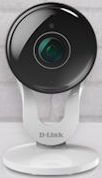 The D-Link Full HD Wi-Fi Camera for $79 then steps up to higher-res 1080p Full HD video (1920 x 1080).
It has a wider 130 degree field of view and is a bit taller at 4.3 inches.
The D-Link Full HD Wi-Fi Camera for $79 then steps up to higher-res 1080p Full HD video (1920 x 1080).
It has a wider 130 degree field of view and is a bit taller at 4.3 inches.
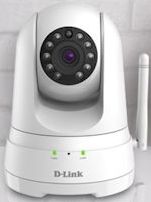 Finally, there's the D-Link Full HD Pan & Tilt Wi-Fi Camera for $99.
This is a 1080p camera with 114 degree field of view. It's a bit chunkier at 4.38 x 5.26 x 4.58 inches, and 0.73 pounds.
Plus, it adds the ability to see a much wider area by remotely panning side by side to see behind (170 degrees to each side) and tilting it up and down (up 90 degrees to look straight up and down 20 degrees).
Finally, there's the D-Link Full HD Pan & Tilt Wi-Fi Camera for $99.
This is a 1080p camera with 114 degree field of view. It's a bit chunkier at 4.38 x 5.26 x 4.58 inches, and 0.73 pounds.
Plus, it adds the ability to see a much wider area by remotely panning side by side to see behind (170 degrees to each side) and tilting it up and down (up 90 degrees to look straight up and down 20 degrees).
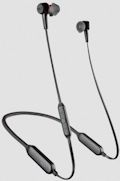 For longer use in earbuds, the Plantronics BackBeat GO 410 Earbuds add a flexible neckband that sits behind your head, with cables running up to the two earbuds.
This design provides the space for extended use -- up to 8 hours listening with ANC, and 10 hours without ANC. And it allows the use of additional electronics, especially the active noise-canceling and voice assistant integration.
They also allow you to insert and remove the earbuds easily. When you remove them, they snap together magnetically to hang out of the way, which also turns off ANC and disconnects Bluetooth to save power. And unlatching them will automatically re-connect Bluetooth and answer an incoming call.
The power cable also is dual-use - the USB charging tip pops off to convert the cable into a standard 3.5 mm audio connector, so you can still use the earbuds with a wired connection even if the battery is dead.
The BackBeat GO 410 Earbuds are available for around $129, in black and white.
For longer use in earbuds, the Plantronics BackBeat GO 410 Earbuds add a flexible neckband that sits behind your head, with cables running up to the two earbuds.
This design provides the space for extended use -- up to 8 hours listening with ANC, and 10 hours without ANC. And it allows the use of additional electronics, especially the active noise-canceling and voice assistant integration.
They also allow you to insert and remove the earbuds easily. When you remove them, they snap together magnetically to hang out of the way, which also turns off ANC and disconnects Bluetooth to save power. And unlatching them will automatically re-connect Bluetooth and answer an incoming call.
The power cable also is dual-use - the USB charging tip pops off to convert the cable into a standard 3.5 mm audio connector, so you can still use the earbuds with a wired connection even if the battery is dead.
The BackBeat GO 410 Earbuds are available for around $129, in black and white.
 Then, of course, the best way to isolate yourself on a long plane trip is to use over-the ear headphones, like the Plantronics BackBeat GO 810 Headphones.
These are designed for commuters and travelers, with up to 22 hours of listening time with ANC, and 28 without ANC.
They have a slim over-the-ear design with memory-foam padding, weigh only 7 ounces, and fold flat for travel.
The earpieces have room for multiple controls, including volume, skip tracks, and take calls, plus manual controls including select EQ presets, ANC on/off, and activate voice assistants.
The headphones support an extended range Bluetooth connection of up to a 164 feet with compatible devices. You also can connect to two devices simultaneously and stream from either one.
The Plantronics BackBeat GO 810 headphones are available for around $149, in blue, black, or white.
Either way, you can have comfortable extended listening, and still be able to move around without being tethered to your smartphone or tablet. The active noise-canceling is a nice bonus, and without the strong pressure you have felt with older products.
- See full Holiday Tech 2018 presentation for my local talks in the Princeton area
- See companion article in U.S. 1 Newspaper, Nov. 14, 2018
Then, of course, the best way to isolate yourself on a long plane trip is to use over-the ear headphones, like the Plantronics BackBeat GO 810 Headphones.
These are designed for commuters and travelers, with up to 22 hours of listening time with ANC, and 28 without ANC.
They have a slim over-the-ear design with memory-foam padding, weigh only 7 ounces, and fold flat for travel.
The earpieces have room for multiple controls, including volume, skip tracks, and take calls, plus manual controls including select EQ presets, ANC on/off, and activate voice assistants.
The headphones support an extended range Bluetooth connection of up to a 164 feet with compatible devices. You also can connect to two devices simultaneously and stream from either one.
The Plantronics BackBeat GO 810 headphones are available for around $149, in blue, black, or white.
Either way, you can have comfortable extended listening, and still be able to move around without being tethered to your smartphone or tablet. The active noise-canceling is a nice bonus, and without the strong pressure you have felt with older products.
- See full Holiday Tech 2018 presentation for my local talks in the Princeton area
- See companion article in U.S. 1 Newspaper, Nov. 14, 2018
 One nice solution, used with the Altec Lansing True EVO Wireless Earbuds, is to provide a carrying case to store the earbuds and keep them safe.
Altec Lansing also builds battery into the case, so whenever you remove the earbuds they can be immediately recharging in the case.
The True EVO earbuds have a 4 hour battery life, plus can add 4 additional charges from the case.
Then, as an extra bonus, the case can be charged not only by USB, but also through Qi wireless charging. So just place the case on a Qi charger and it also can recharge with no wires.
The other issue with earbuds is the hostile environment that builds up in your ears when you move around and exercise. The True EVO earbuds are designed to be rugged, especially for sports, and are sweatproof and waterproof.
These also provide double-tap access to the Apple Siri or Hey Google voice assistant, and have a 30 feet wireless range.
To minimize your audio equipment, the Altec Lansing True EVO Wireless Earbuds are available for around $99.
- See full Holiday Tech 2018 presentation for my local talks in the Princeton area
- See companion article in U.S. 1 Newspaper, Nov. 14, 2018
One nice solution, used with the Altec Lansing True EVO Wireless Earbuds, is to provide a carrying case to store the earbuds and keep them safe.
Altec Lansing also builds battery into the case, so whenever you remove the earbuds they can be immediately recharging in the case.
The True EVO earbuds have a 4 hour battery life, plus can add 4 additional charges from the case.
Then, as an extra bonus, the case can be charged not only by USB, but also through Qi wireless charging. So just place the case on a Qi charger and it also can recharge with no wires.
The other issue with earbuds is the hostile environment that builds up in your ears when you move around and exercise. The True EVO earbuds are designed to be rugged, especially for sports, and are sweatproof and waterproof.
These also provide double-tap access to the Apple Siri or Hey Google voice assistant, and have a 30 feet wireless range.
To minimize your audio equipment, the Altec Lansing True EVO Wireless Earbuds are available for around $99.
- See full Holiday Tech 2018 presentation for my local talks in the Princeton area
- See companion article in U.S. 1 Newspaper, Nov. 14, 2018
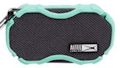 For personal use, at your desk or in a hotel room, you can start with a mini speaker like the Altec Lansing Baby Boom, a compact, rugged speaker that is smaller than your hand (around 4 x 2 x 1 inches, and 1/4 pound).
The Baby Boom puts out impressive sound for its size, with two 1" drivers with neodymium magnets.
You can pair two of them as stereo speakers, with a 30 foot wireless range. And it works as a hands-free speakerphone for your smartphone. It also has a 3.5 mm auxiliary input to play from other wired sources.
The Altec Lansing Baby Boom has 6 hours of battery life, is waterproof and floats, and is available for around $29. It even has a carabineer clip to attach to your backpack.
For personal use, at your desk or in a hotel room, you can start with a mini speaker like the Altec Lansing Baby Boom, a compact, rugged speaker that is smaller than your hand (around 4 x 2 x 1 inches, and 1/4 pound).
The Baby Boom puts out impressive sound for its size, with two 1" drivers with neodymium magnets.
You can pair two of them as stereo speakers, with a 30 foot wireless range. And it works as a hands-free speakerphone for your smartphone. It also has a 3.5 mm auxiliary input to play from other wired sources.
The Altec Lansing Baby Boom has 6 hours of battery life, is waterproof and floats, and is available for around $29. It even has a carabineer clip to attach to your backpack.
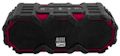 Or step up to a slightly larger speaker like the Altec Lansing Mini LifeJacket Jolt, a compact speaker with serious bass (around 6 1/4 x 2 1/2 x 2 1/4 inches).
This is not quite pocket size, with dual 1.5" neodymium drives / woofers plus two 40mm passive radiators, has a 100 foot wireless range, and you can pair up to 50 speakers at once for a big house party.
It also has a dedicated button to activate Apple Siri or Google Assistant, and is waterproof and floats.
The Altec Lansing Mini LifeJacket Jolt has 16 hours of battery life, and has a USB port so it also can be used as a charger for your smartphone. It's available for around $79.
Or step up to a slightly larger speaker like the Altec Lansing Mini LifeJacket Jolt, a compact speaker with serious bass (around 6 1/4 x 2 1/2 x 2 1/4 inches).
This is not quite pocket size, with dual 1.5" neodymium drives / woofers plus two 40mm passive radiators, has a 100 foot wireless range, and you can pair up to 50 speakers at once for a big house party.
It also has a dedicated button to activate Apple Siri or Google Assistant, and is waterproof and floats.
The Altec Lansing Mini LifeJacket Jolt has 16 hours of battery life, and has a USB port so it also can be used as a charger for your smartphone. It's available for around $79.
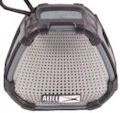 Then the Altec Lansing Versa line of smart speakers pairs and plays over both Bluetooth (for on the go) and Wi-Fi (for at home). Use the Altec Lansing VersA Navigator app for Wi-Fi setup and to bridge to Amazon Alexa for tap-to-talk voice control.
The smaller Altec Lansing VersA 2 Go model is still relatively compact (around 4 x 4 x 2 inches).
It delivers impressive sound with a 1.75" woofer and 2" passive radiator, with a 100 foot wireless range.
Altec Lansing VersA 2 Go is waterproof, has 8 hours of battery life, and is available for around $69., It also has a carabineer clip.
So in the range of $29 to $79 you can have a rugged Bluetooth speaker that syncs cleanly with your smartphone to deliver improved sound and relay voice commands. They talk to you to confirm power on and Bluetooth pairing status. These also all have a two-sided design, to fill a space better by pumping out sound in all directions.
- See full Holiday Tech 2018 presentation for my local talks in the Princeton area
- See companion article in U.S. 1 Newspaper, Nov. 14, 2018
Then the Altec Lansing Versa line of smart speakers pairs and plays over both Bluetooth (for on the go) and Wi-Fi (for at home). Use the Altec Lansing VersA Navigator app for Wi-Fi setup and to bridge to Amazon Alexa for tap-to-talk voice control.
The smaller Altec Lansing VersA 2 Go model is still relatively compact (around 4 x 4 x 2 inches).
It delivers impressive sound with a 1.75" woofer and 2" passive radiator, with a 100 foot wireless range.
Altec Lansing VersA 2 Go is waterproof, has 8 hours of battery life, and is available for around $69., It also has a carabineer clip.
So in the range of $29 to $79 you can have a rugged Bluetooth speaker that syncs cleanly with your smartphone to deliver improved sound and relay voice commands. They talk to you to confirm power on and Bluetooth pairing status. These also all have a two-sided design, to fill a space better by pumping out sound in all directions.
- See full Holiday Tech 2018 presentation for my local talks in the Princeton area
- See companion article in U.S. 1 Newspaper, Nov. 14, 2018
 For example, the TP-Link Kasa Smart Plugs allow you to remotely control anything that you plug into them, for example to turn the holiday decorations on and off.
  Similarly, this year's TP-Link Kasa Smart Light Bulb line includes new dimmable (adjust brightness), Tunable (soft to bright light), and Multicolor bulbs that have improved in all three of these ways.
The new TP-Link Kasa Multicolor Smart Light Bulb (KL130) is dimmable, tunable, and can adjust the color (2500K - 9000K). The big difference is the further compaction of the Wi-Fi and color tuning electronics, thinning the shape so that it's even closer to the volume of a traditional light bulb.
Kasa Multicolor Smart Light Bulb is available for around $39, compared to $42 for the previous model last year.
And it's smaller -- 4.65 x 2.36 inches vs 5.14 x 2.56 inches (118 x 60 mm vs 130.5 x 65 mm) -- and lighter -- 0.3 pounds vs 0.4 pounds (139 g vs 180 g).
So it's fun to see the improvement in these products in just a year, and to control devices in your home to make them smart. For example, think about what you can do with holiday decorations -- displaying colors and controlling other decorations directly, or by setting up a daily schedule of changes over time.
- See full Holiday Tech 2018 presentation for my local talks in the Princeton area
- See companion article in U.S. 1 Newspaper, Nov. 14, 2018
Similarly, this year's TP-Link Kasa Smart Light Bulb line includes new dimmable (adjust brightness), Tunable (soft to bright light), and Multicolor bulbs that have improved in all three of these ways.
The new TP-Link Kasa Multicolor Smart Light Bulb (KL130) is dimmable, tunable, and can adjust the color (2500K - 9000K). The big difference is the further compaction of the Wi-Fi and color tuning electronics, thinning the shape so that it's even closer to the volume of a traditional light bulb.
Kasa Multicolor Smart Light Bulb is available for around $39, compared to $42 for the previous model last year.
And it's smaller -- 4.65 x 2.36 inches vs 5.14 x 2.56 inches (118 x 60 mm vs 130.5 x 65 mm) -- and lighter -- 0.3 pounds vs 0.4 pounds (139 g vs 180 g).
So it's fun to see the improvement in these products in just a year, and to control devices in your home to make them smart. For example, think about what you can do with holiday decorations -- displaying colors and controlling other decorations directly, or by setting up a daily schedule of changes over time.
- See full Holiday Tech 2018 presentation for my local talks in the Princeton area
- See companion article in U.S. 1 Newspaper, Nov. 14, 2018
 Ventev also offers the Ventev Wireless Chargestand for smartphones, in addition to its traditional batteries and chargers (see previous post).
The Wireless Chargestand is a combination desktop charger and smartphone stand. The wireless charging puck is removable, so you can use it (and the stand) independently.
The stand and its aluminum frame are adjustable, for two viewing angles, for different positions (portrait, landscape, or flat on table), and for optimal charging centered on the back of the smartphone.
The Chargestand provides 15W of power, so you can use the smartphone while it is charging. And it supports fast wireless charging, so the smartphone can charge 50% in one hour. It also has built-in protection from short circuit, overcharge, overdischarge, and overcurrent.
Interestingly, the Chargestand supports both the Qi and PMA wireless charging standards, so can work with a variety of older and newer devices.
The Ventev Wireless Chargestand is available for around $59. It's a nice flexible design, supporting multiple uses (flat and as a stand), and multiple devices (Qi and PMA).
- See full Holiday Tech 2018 presentation for my local talks in the Princeton area
- See companion article in U.S. 1 Newspaper, Nov. 14, 2018
Ventev also offers the Ventev Wireless Chargestand for smartphones, in addition to its traditional batteries and chargers (see previous post).
The Wireless Chargestand is a combination desktop charger and smartphone stand. The wireless charging puck is removable, so you can use it (and the stand) independently.
The stand and its aluminum frame are adjustable, for two viewing angles, for different positions (portrait, landscape, or flat on table), and for optimal charging centered on the back of the smartphone.
The Chargestand provides 15W of power, so you can use the smartphone while it is charging. And it supports fast wireless charging, so the smartphone can charge 50% in one hour. It also has built-in protection from short circuit, overcharge, overdischarge, and overcurrent.
Interestingly, the Chargestand supports both the Qi and PMA wireless charging standards, so can work with a variety of older and newer devices.
The Ventev Wireless Chargestand is available for around $59. It's a nice flexible design, supporting multiple uses (flat and as a stand), and multiple devices (Qi and PMA).
- See full Holiday Tech 2018 presentation for my local talks in the Princeton area
- See companion article in U.S. 1 Newspaper, Nov. 14, 2018
 For example, the Ventev Powercell 6010+ Backup Battery is a combination external battery pack and wall charger. It has everything you need built in - folding AC prongs to plug in to the wall to recharge the battery, and a built-in cable (Apple Lightning or USB type C) to feed your devices.
The 6000 mAh battery has 12W total output, so it can charge a tablet, or two smartphones at once (using the built-in cable and the additional USB port). It recharges in 4 to 5 hours
But it still is relatively small and light -- shirt-pocket size at 5.2 x 0.7 x 2.7 inches, and 6.7 ounces.
The Ventev Powercell 6010+ is available for around $49 in two versions, with Apple Lightning or USB type C cable.
For example, the Ventev Powercell 6010+ Backup Battery is a combination external battery pack and wall charger. It has everything you need built in - folding AC prongs to plug in to the wall to recharge the battery, and a built-in cable (Apple Lightning or USB type C) to feed your devices.
The 6000 mAh battery has 12W total output, so it can charge a tablet, or two smartphones at once (using the built-in cable and the additional USB port). It recharges in 4 to 5 hours
But it still is relatively small and light -- shirt-pocket size at 5.2 x 0.7 x 2.7 inches, and 6.7 ounces.
The Ventev Powercell 6010+ is available for around $49 in two versions, with Apple Lightning or USB type C cable. Another option is a combination desktop charging stand and backup battery like the Ventev Chargestand 3000c Backup Battery/Stand.
This is a lightweight combination portable desktop charger, stand, and battery. It's around 3 1/8 x 2 1/4 x 1 1/8 inches.
As a stand, it pops open so you can position your smartphone in either portrait or landscape orientations.
As a desktop charger, you can dock your smartphone with the included flat cable that nests in the stand.
As a portable battery, you can close the stand and unroll the built-in cable to charge your smartphone on the go. The 3000mAh battery charges one smartphone, and recharges in 3 to 4 hours.
The Ventev Chargestand 3000c is available for around $49 in three versions, with built-in microUSB, USB-C, or Apple Lightning cable.
- See full Holiday Tech 2018 presentation for my local talks in the Princeton area
- See companion article in U.S. 1 Newspaper, Nov. 14, 2018
Another option is a combination desktop charging stand and backup battery like the Ventev Chargestand 3000c Backup Battery/Stand.
This is a lightweight combination portable desktop charger, stand, and battery. It's around 3 1/8 x 2 1/4 x 1 1/8 inches.
As a stand, it pops open so you can position your smartphone in either portrait or landscape orientations.
As a desktop charger, you can dock your smartphone with the included flat cable that nests in the stand.
As a portable battery, you can close the stand and unroll the built-in cable to charge your smartphone on the go. The 3000mAh battery charges one smartphone, and recharges in 3 to 4 hours.
The Ventev Chargestand 3000c is available for around $49 in three versions, with built-in microUSB, USB-C, or Apple Lightning cable.
- See full Holiday Tech 2018 presentation for my local talks in the Princeton area
- See companion article in U.S. 1 Newspaper, Nov. 14, 2018
 The WD My Passport Wireless Pro is a wireless hard-disk drive, SD card reader, and powerbank. It's about 5 x 5 inches square and 0.9 inches thick, and weighs around 15 1/2 ounces.
It's available with 1 TB of storage for around $149, 2 TB for $139, 3 TB for $199, and 4 TB for $189.
The WD My Passport Wireless Pro is a wireless hard-disk drive, SD card reader, and powerbank. It's about 5 x 5 inches square and 0.9 inches thick, and weighs around 15 1/2 ounces.
It's available with 1 TB of storage for around $149, 2 TB for $139, 3 TB for $199, and 4 TB for $189.  The WD My Passport Wireless SSD provides the same functions with a solid-state drive. It's especially durable with the SSD electronics and a protective bumper, so it's protected from shock, vibrations, and drops of up to 1 meter, even in operation.
It's available with 256 GB of storage for around $229, 500 GB for $299, 1 TB for $499, and 2 TB for $799.
The WD My Passport Wireless SSD provides the same functions with a solid-state drive. It's especially durable with the SSD electronics and a protective bumper, so it's protected from shock, vibrations, and drops of up to 1 meter, even in operation.
It's available with 256 GB of storage for around $229, 500 GB for $299, 1 TB for $499, and 2 TB for $799.  You can start with the Western Digital My Passport Ultra portable hard drive. It's slim and light (4.44 x 3.21 x 0.50 in), with a textured anodized metal cover. It has a native USB-C interface to work with newer products, and also comes with a USB 3.0 adapter for the rest of your systems.
The My Passport Ultra has hardware encryption, and is available with 1 TB of storage for $69, 2 TB for $89, and 4 TB for $129.
You can start with the Western Digital My Passport Ultra portable hard drive. It's slim and light (4.44 x 3.21 x 0.50 in), with a textured anodized metal cover. It has a native USB-C interface to work with newer products, and also comes with a USB 3.0 adapter for the rest of your systems.
The My Passport Ultra has hardware encryption, and is available with 1 TB of storage for $69, 2 TB for $89, and 4 TB for $129. Then the Western Digital My Passport SSD provides the advantages of solid-state storage, in a smaller and thinner package (3.5 x 1.8 x 0.39 in.), also with a USB-C native interface and hardware encryption.
However, the My Passport SSD has a serious jump in price for the benefits of SSD -- 250 GB for around $99, 512 GB for $149, 1 TB for $299, and 2 TB for $599.
Then the Western Digital My Passport SSD provides the advantages of solid-state storage, in a smaller and thinner package (3.5 x 1.8 x 0.39 in.), also with a USB-C native interface and hardware encryption.
However, the My Passport SSD has a serious jump in price for the benefits of SSD -- 250 GB for around $99, 512 GB for $149, 1 TB for $299, and 2 TB for $599. The Kingston DataTraveler microDuo 3C is a dual drive with both standard USB and USB-C ports.
It works with Android devices that support USB OTG (On-The-Go) drives to provide expanded storage like a flash drive.
The microDuo 3C is tiny at less than 1.2 inches long, and seriously inexpensive at 32 GB of storage for around $12, 64 GB for $19, and 128 GB for $39.
The Kingston DataTraveler microDuo 3C is a dual drive with both standard USB and USB-C ports.
It works with Android devices that support USB OTG (On-The-Go) drives to provide expanded storage like a flash drive.
The microDuo 3C is tiny at less than 1.2 inches long, and seriously inexpensive at 32 GB of storage for around $12, 64 GB for $19, and 128 GB for $39.
 Similarly, the Kingston DataTraveler Bolt Duo provides extended storage for iPhones and iPads, with both a USB and a Lightning connector.
Since iOS does not support general file access to storage, the Bolt Duo focuses on handling your photos and videos. You can transfer your photos/videos to the drive, capture directly to the drive, and view the files on the drive.
You also can set up the device to automatically back up photos and videos from your camera roll, and even optionally delete the originals to free up space.
The Bolt Duo supports USB 3.1 transfer speeds (120MB/s read and 19MB/s write), and is available with 32 GB of storage for around $34, 64 GB for $39, and 128 GB for $69.
With these capacities, "just" 32 GB holds up to some 8,000 photos or 2 hours of video, and 128 GB holds up to 32,000 photos or 8 hours of video.
- See full Holiday Tech 2018 presentation for my local talks in the Princeton area
- See companion article in U.S. 1 Newspaper, Nov. 14, 2018
Similarly, the Kingston DataTraveler Bolt Duo provides extended storage for iPhones and iPads, with both a USB and a Lightning connector.
Since iOS does not support general file access to storage, the Bolt Duo focuses on handling your photos and videos. You can transfer your photos/videos to the drive, capture directly to the drive, and view the files on the drive.
You also can set up the device to automatically back up photos and videos from your camera roll, and even optionally delete the originals to free up space.
The Bolt Duo supports USB 3.1 transfer speeds (120MB/s read and 19MB/s write), and is available with 32 GB of storage for around $34, 64 GB for $39, and 128 GB for $69.
With these capacities, "just" 32 GB holds up to some 8,000 photos or 2 hours of video, and 128 GB holds up to 32,000 photos or 8 hours of video.
- See full Holiday Tech 2018 presentation for my local talks in the Princeton area
- See companion article in U.S. 1 Newspaper, Nov. 14, 2018
 Otherwise, you can use a card reader like the Kingston MobileLite G4 USB 3.0 Card Reader to plug in to a USB port on the computer and then insert cards to read.
The MobileLite G4 is small so it's easy to pack along with your laptop, with a rugged metallic design.
You can insert and access both a SD and a microSD card simultaneously, and transfer at USB 3.0 rates. The MobileLite G4 is available for around $11, so it's easy to always have with your computer.
Otherwise, you can use a card reader like the Kingston MobileLite G4 USB 3.0 Card Reader to plug in to a USB port on the computer and then insert cards to read.
The MobileLite G4 is small so it's easy to pack along with your laptop, with a rugged metallic design.
You can insert and access both a SD and a microSD card simultaneously, and transfer at USB 3.0 rates. The MobileLite G4 is available for around $11, so it's easy to always have with your computer.
 But USB 3.0 is so old hat -- USB Type C is the new, better connector that is now being used on both laptops and on portable devices including smartphones and tablets.
For portable devices, USB-C is like microUSB, except that the connector is reversible -- so that you no longer need to fuss with plugging in a cable the right way around.
And for laptops, it's smaller than USB, and has the capacity to be used for power, disk data transfers, and even digital video displays.
The Kingston Nucleum USB-C Hub is a multiport adapter that showcases the flexibility of USB-C. This small and light device includes a built-in cable to plug in to your host laptop, and then provides 7 expansion ports:
But USB 3.0 is so old hat -- USB Type C is the new, better connector that is now being used on both laptops and on portable devices including smartphones and tablets.
For portable devices, USB-C is like microUSB, except that the connector is reversible -- so that you no longer need to fuss with plugging in a cable the right way around.
And for laptops, it's smaller than USB, and has the capacity to be used for power, disk data transfers, and even digital video displays.
The Kingston Nucleum USB-C Hub is a multiport adapter that showcases the flexibility of USB-C. This small and light device includes a built-in cable to plug in to your host laptop, and then provides 7 expansion ports: